טלפון

03-617-6888

רחוב כנרת 15, בני-ברק
5120260 ישראל

CALL US

972-3-6176888

15Kineret st,Beni-Brak

5120260 Israel

CV380-CS

CV380-CS

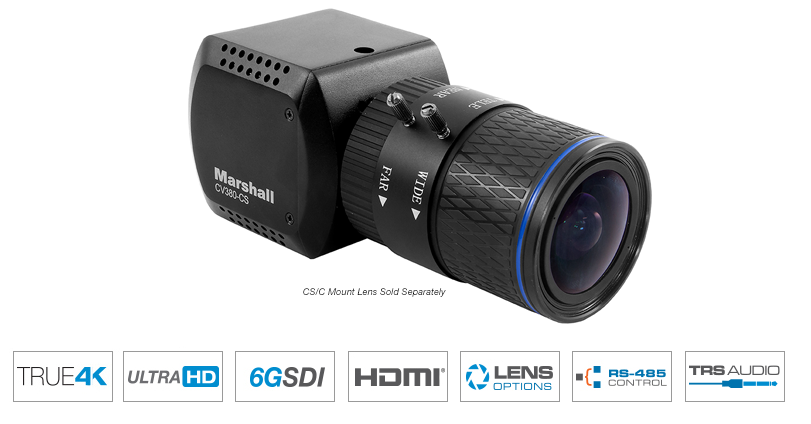
Marshall CV380-CS

Compact 4K30 Camera (6GSDI & HDMI)

CV380 - Compact 4K30 Camera (6GSDI & HDMI)

  • 6G-SDI (single BNC) & HDMI 1.4 outputs
  • 8.5 Megapixel (1/2.5") sensor (4:2:2)
  • CS/C-mount for Varifocal or Fixed lenses
  • True-4K: 4096 x 2160p @ 30, 29.97, 25, 24, 23.98 fps
  • Ultra-HD: 3840 x 2160p @ 30, 29.97, 25, 24, 23.98 fps
  • HD (Progressive): 1080p / 720p @ 60, 59.94, 50, 30, 29.97, 25, 24, 23.98 fps
  • HD (Interlaced): 1920 x 1080i @ 60, 59.94, 50 fps
  • Color Matrix function: Style, Master Level, Master Phase, Color Level, Color Phase
  • TRS stereo audio inputs (mic & line level)
  • Audio Line input does not provide power to the audio device. Mic will use Mic Bias 1.7V and up to 3mA max current
  • Remote adjust and match through RS485 (Visca) or OSD menu joystick
  • Wide range of broadcast picture adjustment settings
  • 12v power supply, can operate 12V+/-10% with a 6 watt draw

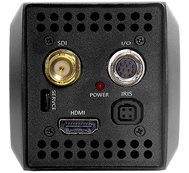
CV380 4K30 rear connectionsRear view of CV380-CS

The Marshall CV380-CS is a compact, true 4K camera built around an 8.5-Megapixel, 1/2.5-inch sensor that delivers ultra-crisp, clear true 4K resolution in 4096x2160p. The CV380-CS contains a single 6G (BNC) output with 6G/3G/HD-SDI capability and a simultaneous HDMI output. The flexible CS/C lens mount offers a wide variety of lens options with DC Auto-Iris plug-in ability.

The CV380-CS is a versatile and powerful camera solution in an easy-to-understand design. Remote adjust and match control is delivered via RS485 (Visca) or OSD menu joystick on breakout-cable. A wide range of picture adjustment settings are available such as paint (red/blue), white balance, gain control, pedestal (blacks), exposure, gamma, and more. The CV380-CS delivers ultra-clear 4K or UHD video while maintaining a discrete presence. Use it to capture wide 4096×2160 (4K) video and pull HD frames in post, or as a flexibility spill-over shot, or for unique points-of-view and more.
CV380-CS Applications:

Broadcast Sports, Broadcast Television, Broadcast News, House of Worship, Courtroom, Government Assembly, Live Music & Events, Studio Production, Remote Learning, ProVideo, Broadcast Production, Cinematic Production

Camera Control Application

  1. Download Camera Control Software HERE
  2. Use USB to RS485/RS422 Converter (CV-USB-RS485)
  3. Use cat5 or 24AWG twisted-pair wire (sold separately)
  4. Connect cable from RS485(+) terminal on Camera to T/R (+) on USB/RS485 converter
  5. Connect cable from RS485(-) terminal on Camera to T/R (-) on USB/RS485 converter
  6. Plug USB cable from USB/RS485 converter into USB port on Laptop or Computer (note ComPort#)
  7. Open up CamControl Program and match Serial Port to corresponding ComPort# used
  8. Select Baudrate in CamControl Program and match it in Camera OSD Menu under DISPLAY CONTROL > BAUDRATE
  9. Select Camera Address in CamControl Program and match it in Camera OSD Menu under DISPLAY CONTROL > CAM ID
  10. Select Open in CamControl Program
  11. Test connection by pushing MENU in lower right of CamControl Program – OSD Menu should come up on video signal
  12. Commands can also be sent without using OSD Menu

לפנות להצעת מחיר וזמן אספקה

For an attractive quote and to order the product

Call : 972-3-6176888

Message Us